


ComparisonCRM
Zoho CRM vs Custom CRM: When Should You Build Your Own?
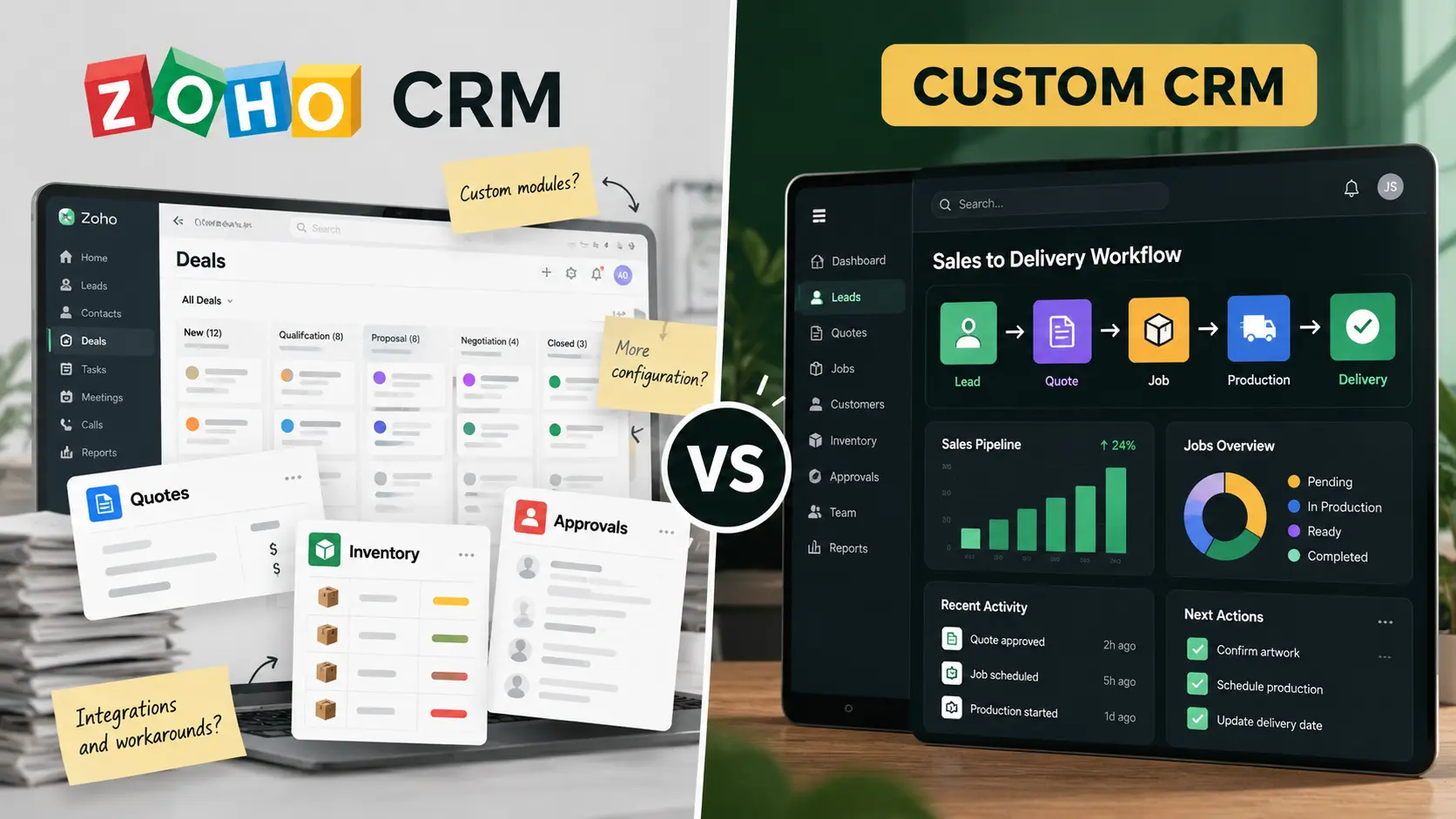
Zoho CRM is configurable, but configuration has a ceiling. If your team spends more time adapting Zoho and stitching tools together than moving work forward, compare the cost of continuing to customize with owning a CRM built for your operation.

Get a Quote
Already know which one you need?
Get a tailored quote within 12-24 hrs.




Trusted by 50+ businesses as their technical partner
100+
Projects delivered
10+
Industries served
8+
Years in business
Zoho CRM vs Custom CRM: When Should You Build Your Own? — 8 decision criteria
Hover a column to isolate one option. Highlighted rows are where each option wins — the full reasoning behind every judgment is below.
| What matters | Zoho CRM Configurable off-the-shelf SaaS | Custom CRM by XupyterOurs Built around your workflow |
|---|---|---|
| Standard CRM functions | Generic leads, contacts, and deals that every business has to interpret its own way | The CRM functions your business needs, named and structured around your process Best choice |
| Configuration ceiling | Customization stops where Zoho’s model, fields, and automation rules stop | No platform ceiling: the data model and workflow are designed for your requirements Best choice |
| Business-specific operations | Operational steps require add-ons, other Zoho products, or external integrations | Quoting, approvals, jobs, and operational steps live in one connected application Best choice |
| Cross-system workflow | Connectors depend on plan limits, available APIs, and third-party support | Integrations scoped around your systems, ownership, and failure handling Best choice |
| Changes over time | Platform changes and roadmap decisions are outside your control | You decide what changes, when, and in what order as the business evolves Best choice |
| Reporting | Reports only cover the data Zoho holds and how well it was configured | Reporting across the full workflow you actually run, including operational data Best choice |
| Cost structure | Subscriptions, add-ons, implementation, and per-user costs rise as you scale | One build investment plus predictable hosting and maintenance — no per-seat tax Best choice |
| Time to value | Quick start if you fit the standard model; months of configuration if you do not | Discovery then a focused build, so the system matches the work at launch Best choice |
Zoho CRM
Generic leads, contacts, and deals that every business has to interpret its own way
Custom CRM by Xupyter· ours
The CRM functions your business needs, named and structured around your process
Zoho CRM
Customization stops where Zoho’s model, fields, and automation rules stop
Custom CRM by Xupyter· ours
No platform ceiling: the data model and workflow are designed for your requirements
Zoho CRM
Operational steps require add-ons, other Zoho products, or external integrations
Custom CRM by Xupyter· ours
Quoting, approvals, jobs, and operational steps live in one connected application
Zoho CRM
Connectors depend on plan limits, available APIs, and third-party support
Custom CRM by Xupyter· ours
Integrations scoped around your systems, ownership, and failure handling
Zoho CRM
Platform changes and roadmap decisions are outside your control
Custom CRM by Xupyter· ours
You decide what changes, when, and in what order as the business evolves
Zoho CRM
Reports only cover the data Zoho holds and how well it was configured
Custom CRM by Xupyter· ours
Reporting across the full workflow you actually run, including operational data
Zoho CRM
Subscriptions, add-ons, implementation, and per-user costs rise as you scale
Custom CRM by Xupyter· ours
One build investment plus predictable hosting and maintenance — no per-seat tax
Zoho CRM
Quick start if you fit the standard model; months of configuration if you do not
Custom CRM by Xupyter· ours
Discovery then a focused build, so the system matches the work at launch

Verdict
Configuration gets you close. Ownership closes the gap.
Zoho is a capable starting point for standard sales management. But if your team is still paying consultants, buying add-ons, and copying data between systems, the configuration bill is only part of the real cost. A custom CRM removes the ceiling and gives you a system that is designed for how your business actually operates — and improves on your schedule.
Trusted by 50+ businesses as their technical partner
Zoho can cover the basics. The question is what happens next.
Zoho CRM gives a team leads, contacts, deals, automation, and a long list of configuration options. For standard sales management, that can be enough, and it is worth saying so plainly.
The problem appears when the business needs the CRM to do something Zoho did not anticipate. At first it is a custom field. Then an automation rule. Then an extension. Then another Zoho product. Then an integration. Eventually the “simple CRM” becomes a small internal platform held together by configuration and workarounds that only one person fully understands.
Where configuration stops scaling
- Business-specific approval, pricing, or commission rules hit the limits of the platform’s automation.
- Operational work is pushed into plugins, spreadsheets, or a second system.
- Integrations become brittle because each vendor controls what is possible and when.
- Your team’s productivity depends on knowing the workarounds, not on a clean workflow.
That is not a failure of Zoho. It is the natural ceiling of rented, configurable software. You can shape it, but you cannot change what it fundamentally is.
What a custom CRM does differently
A custom CRM begins with the records, rules, and handoffs your business needs. Instead of asking how to make the platform fit, we ask what the operation should look like if software were designed for it.
- A data model built around your terminology, not a vendor’s template.
- Approval, pricing, and commission rules that run exactly as your business defines them.
- One connected workflow from lead to quote to job to delivery.
- Reports that reflect the whole operation, not just the slices Zoho happens to hold.
The cost of “just one more customization”
Every configuration change has a cost: the initial setup, the consultant time, the testing, the training, and the hidden dependency on someone who knows how it was assembled. Those costs rarely appear in one place, which makes them easy to underestimate.
A custom CRM has a higher upfront number, but it replaces recurring subscription tiers, add-on purchases, and ongoing configuration work with a system your business owns. For teams that keep hitting the platform ceiling, that usually produces a lower total cost and far less operational friction.
Keep what works. Replace what holds you back.
You do not always need to rip out every tool. If Zoho handles a genuine standard function well, it can stay. The opportunity is to stop forcing core, revenue-critical workflows through a platform that was not designed for them.
That may mean a custom operational layer beside Zoho, or one owned CRM system that replaces it. The right answer depends on where the real complexity lives.
Map the ceiling before you hit it
Xupyter Solutions helps teams identify exactly where configuration is helping and where it is quietly costing them. We map the current process, quantify the workarounds, and recommend the smallest custom build that removes the ceiling. If Zoho is genuinely enough, we will say so.
Frequently asked questions
Quick answers to common questions about this topic.