



ComparisonInventory
Excel vs Inventory Management Software: What Changes as You Grow?
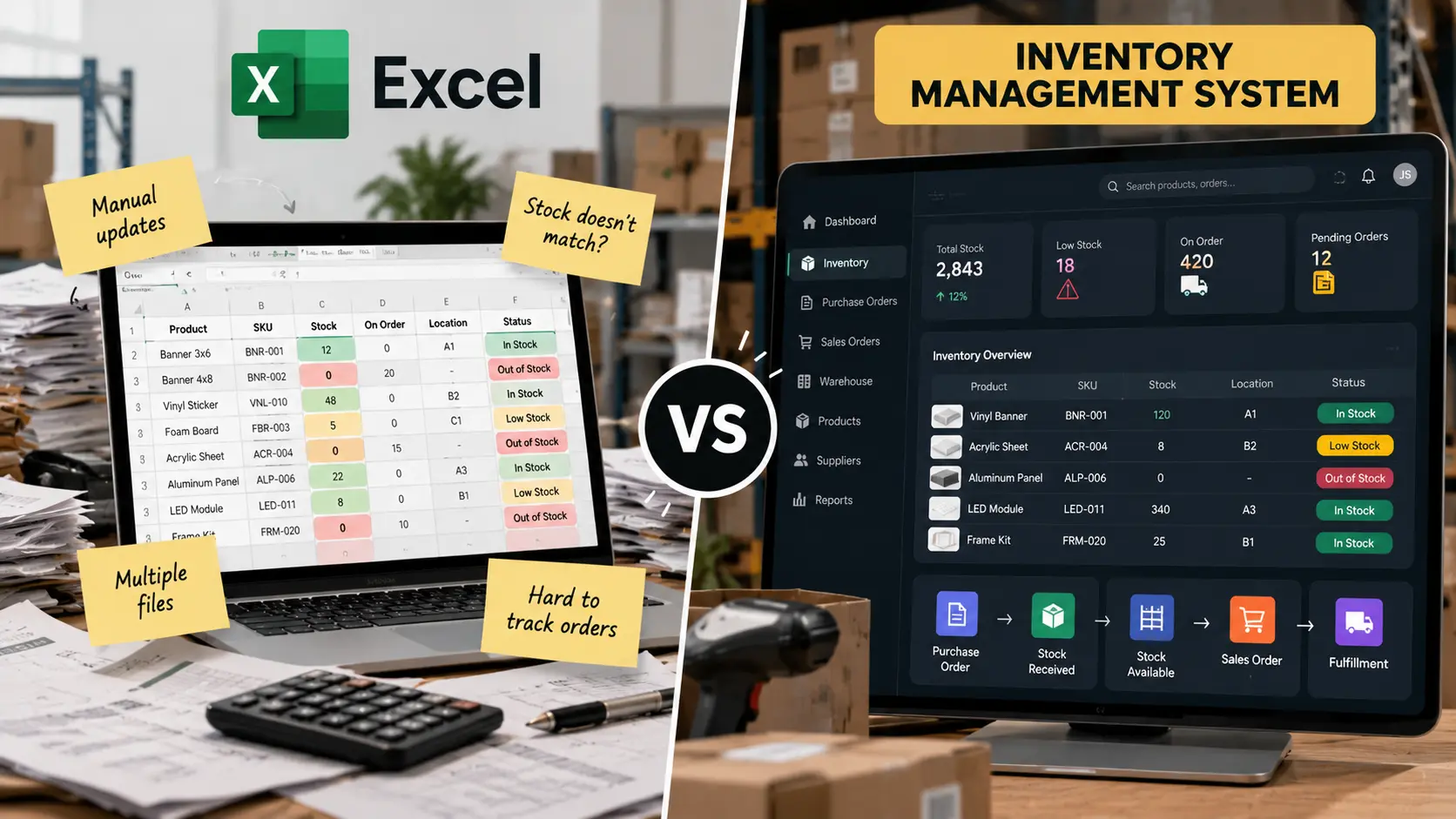
A stock spreadsheet can track quantities. It stops being reliable when purchases, orders, warehouse movements, and fulfilment all depend on the same information. Compare manual tracking with an inventory system built around how your operation actually moves stock.

Get a Quote
Already know which one you need?
Get a tailored quote within 12-24 hrs.




Trusted by 50+ businesses as their technical partner
100+
Projects delivered
10+
Industries served
8+
Years in business
Excel vs Inventory Management Software: What Changes as You Grow? — 8 decision criteria
Hover a column to isolate one option. Highlighted rows are where each option wins — the full reasoning behind every judgment is below.
| What matters | Excel / Spreadsheets Manual stock tracking | Custom Inventory System by XupyterOurs Built around your operation |
|---|---|---|
| Initial setup | Quick to start, but spreadsheets multiply and reconciliation begins immediately | Scoped implementation with clean data migration and a single source of truth Best choice |
| Stock updates | Manual entry and reconciliation; quantities go stale between updates | Every receipt, adjustment, reservation, and dispatch recorded through a workflow Best choice |
| Orders and reservations | Availability checked by hand, so overselling and double-booking happen | Reservations reflect live availability across the operation Best choice |
| Purchasing | Purchase lists live in separate sheets with no reliable link back to stock | Purchasing, receiving, and stock updates are connected end to end Best choice |
| Multiple locations | Location transfers are reconciled manually and errors compound | Warehouses, locations, and transfers modeled with location-level visibility Best choice |
| Production | Materials and finished goods are tracked outside the stock sheet | Production consumption and finished stock connected where relevant Best choice |
| Operational visibility | Reports depend on who updated the sheet last and whether they were accurate | Live view of available, committed, incoming, and exception stock Best choice |
| Ownership cost | Low licence cost, high manual cost, write-offs, and stockouts | Build plus maintenance, with fewer errors and less coordination overhead Best choice |
Excel / Spreadsheets
Quick to start, but spreadsheets multiply and reconciliation begins immediately
Custom Inventory System by Xupyter· ours
Scoped implementation with clean data migration and a single source of truth
Excel / Spreadsheets
Manual entry and reconciliation; quantities go stale between updates
Custom Inventory System by Xupyter· ours
Every receipt, adjustment, reservation, and dispatch recorded through a workflow
Excel / Spreadsheets
Availability checked by hand, so overselling and double-booking happen
Custom Inventory System by Xupyter· ours
Reservations reflect live availability across the operation
Excel / Spreadsheets
Purchase lists live in separate sheets with no reliable link back to stock
Custom Inventory System by Xupyter· ours
Purchasing, receiving, and stock updates are connected end to end
Excel / Spreadsheets
Location transfers are reconciled manually and errors compound
Custom Inventory System by Xupyter· ours
Warehouses, locations, and transfers modeled with location-level visibility
Excel / Spreadsheets
Materials and finished goods are tracked outside the stock sheet
Custom Inventory System by Xupyter· ours
Production consumption and finished stock connected where relevant
Excel / Spreadsheets
Reports depend on who updated the sheet last and whether they were accurate
Custom Inventory System by Xupyter· ours
Live view of available, committed, incoming, and exception stock
Excel / Spreadsheets
Low licence cost, high manual cost, write-offs, and stockouts
Custom Inventory System by Xupyter· ours
Build plus maintenance, with fewer errors and less coordination overhead

Verdict
A spreadsheet counts stock. A system runs the movement.
Excel is fine for a small, single-location stock list maintained by one person. It breaks when purchasing, orders, transfers, and production all affect the same stock at the same time. A custom inventory system records the movement, not just the number — so availability stays accurate, exceptions surface early, and growth does not turn into full-time reconciliation.
Trusted by 50+ businesses as their technical partner
Stock does not sit still
A spreadsheet records what someone typed. An inventory process records what changed, why, and what it means for availability. Orders arrive, goods are received, items move between locations, materials are consumed, and products are reserved. If those events live in different sheets, someone has to reconcile them constantly.
That reconciliation is the real cost of spreadsheet inventory. It is not the file. It is the time, errors, stockouts, and write-offs that happen while the numbers catch up.
Where Excel stops being good enough
- Orders reserve stock that the sheet does not know is already committed.
- Purchasing decisions are made from outdated quantities.
- Warehouse transfers create discrepancies no one can trace.
- Production consumes materials that never appear in the stock record.
- Managers cannot see available, incoming, and committed stock in one place.
None of these are spreadsheet failures. They are the natural limit of a flat file trying to represent a moving operation.
What custom inventory software connects
- Product and material records with the attributes your operation uses.
- Receipts, adjustments, and stock movements with a full audit trail.
- Purchase orders, supplier deliveries, and expected stock.
- Customer orders, reservations, and live availability.
- Warehouse locations, transfers, and location-level visibility.
- Production consumption and finished goods where manufacturing applies.
The exact scope depends on your business. A distributor may need purchasing, receiving, and fulfilment. A manufacturer may also need materials, production stages, and finished stock. A multi-warehouse operation may need transfers and location-level controls.
The cost of staying with Excel
The software cost is low. The hidden cost is the time spent checking quantities, resolving discrepancies, preparing purchase lists, correcting order mistakes, and reconciling stock across locations. Add the revenue lost to stockouts and the margin lost to write-offs, and the spreadsheet stops looking cheap.
A custom system gives the business a structure for recording and acting on every movement. It does not replace good receiving and counting discipline — it makes that discipline enforceable.
Why own the system instead of buying a generic one?
An off-the-shelf inventory product can be a good fit if it matches your workflow. Many do not. Distribution, manufacturing, multi-location, and service inventory all need different records and handoffs. Forcing those differences into a generic tool usually means add-ons, exports, and manual work that recreates the spreadsheet problem in a more expensive package.
A custom inventory system is designed around how your stock actually moves. It connects the records that matter to your operation and rejects the ones that do not, so the team works from one accurate picture.
Start with the movement that costs you most
Xupyter Solutions starts by mapping how stock enters, moves, and leaves your business, then identifies the reconciliation points that cost the most time and money. From there we scope a focused first release that proves the value before expanding across purchasing, orders, locations, or production.
Frequently asked questions
Quick answers to common questions about this topic.