



ComparisonCRM
Excel vs Custom CRM: When Is It Time to Upgrade?
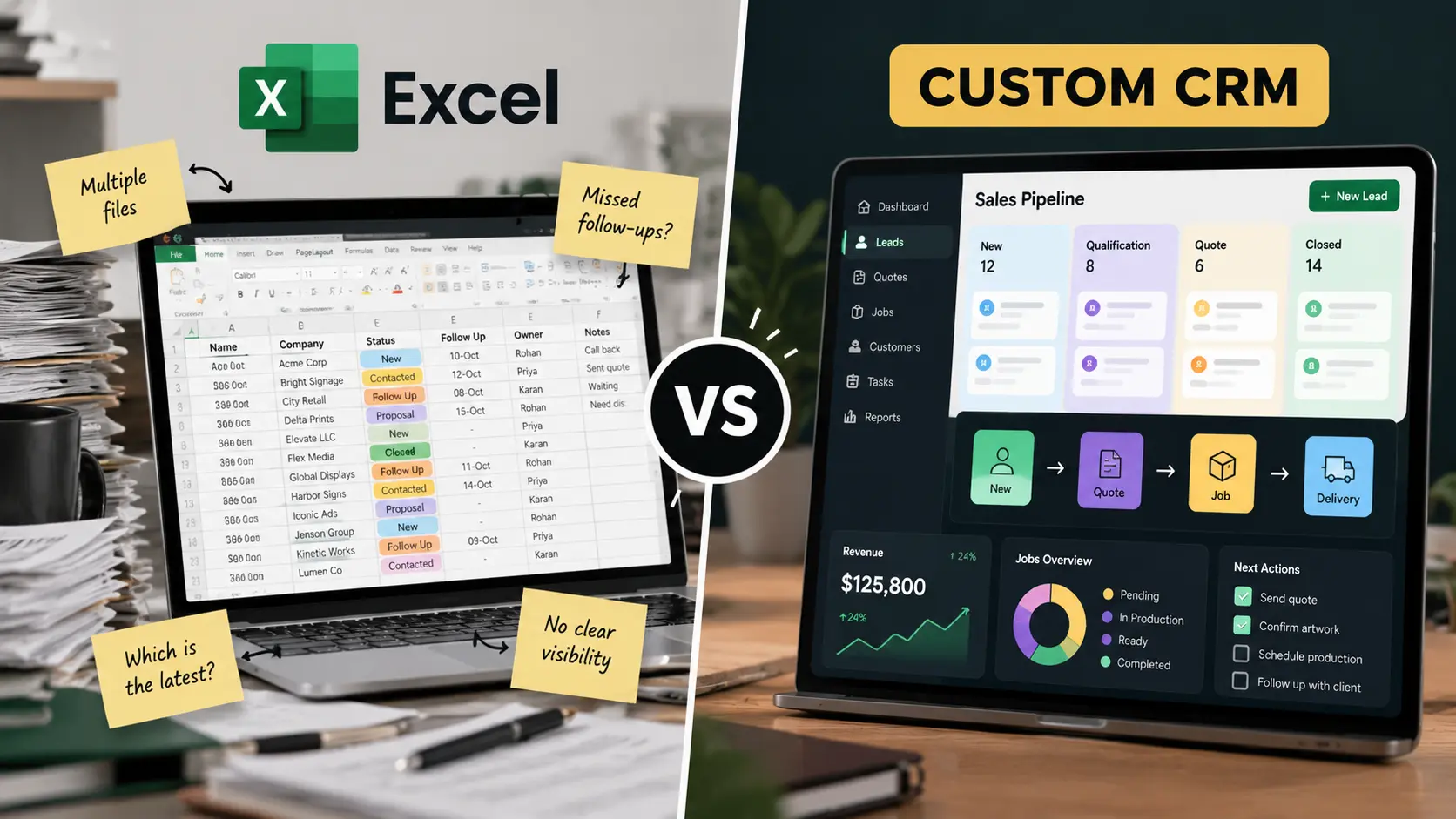
A spreadsheet is a fine place to start. It becomes expensive when follow-ups depend on memory, several people maintain different records, and managers cannot see the pipeline without chasing updates. Here is what changes when you own the system.

Get a Quote
Already know which one you need?
Get a tailored quote within 12-24 hrs.




Trusted by 50+ businesses as their technical partner
100+
Projects delivered
10+
Industries served
8+
Years in business
Excel vs Custom CRM: When Is It Time to Upgrade? — 8 decision criteria
Hover a column to isolate one option. Highlighted rows are where each option wins — the full reasoning behind every judgment is below.
| What matters | Excel / Spreadsheets Manual tracking | Custom CRM by XupyterOurs Built around your workflow |
|---|---|---|
| Getting started | Free and familiar, but the real cost is the manual upkeep that follows | Structured onboarding, data migration, and a system your team can rely on Best choice |
| Lead ownership | Rows do not have owners; accountability lives in email and memory | Every lead has a named owner, next action, and visible status Best choice |
| Follow-up management | Reminders depend on people remembering or maintaining separate calendars | Assigned follow-ups, reminders, and escalation rules run automatically Best choice |
| Shared customer history | Copies, conflicting versions, and context that disappears when someone leaves | One shared customer record with the full activity history Best choice |
| Process enforcement | Depends entirely on team discipline; the spreadsheet cannot enforce anything | Required fields, permissions, and workflow rules keep the process consistent Best choice |
| Reporting | Manual cleanup before every report, and the numbers are only as good as the last edit | Live reporting from clean workflow data, ready when managers need it Best choice |
| Cost of the current method | Cheap software, expensive team time, missed follow-ups, and lost revenue | Predictable investment with lower admin overhead and fewer missed opportunities Best choice |
| Scaling the team | Breaks as volume and headcount grow, then needs a painful migration anyway | Built to scale with your volume, users, and sales rules from the start Best choice |
Excel / Spreadsheets
Free and familiar, but the real cost is the manual upkeep that follows
Custom CRM by Xupyter· ours
Structured onboarding, data migration, and a system your team can rely on
Excel / Spreadsheets
Rows do not have owners; accountability lives in email and memory
Custom CRM by Xupyter· ours
Every lead has a named owner, next action, and visible status
Excel / Spreadsheets
Reminders depend on people remembering or maintaining separate calendars
Custom CRM by Xupyter· ours
Assigned follow-ups, reminders, and escalation rules run automatically
Excel / Spreadsheets
Copies, conflicting versions, and context that disappears when someone leaves
Custom CRM by Xupyter· ours
One shared customer record with the full activity history
Excel / Spreadsheets
Depends entirely on team discipline; the spreadsheet cannot enforce anything
Custom CRM by Xupyter· ours
Required fields, permissions, and workflow rules keep the process consistent
Excel / Spreadsheets
Manual cleanup before every report, and the numbers are only as good as the last edit
Custom CRM by Xupyter· ours
Live reporting from clean workflow data, ready when managers need it
Excel / Spreadsheets
Cheap software, expensive team time, missed follow-ups, and lost revenue
Custom CRM by Xupyter· ours
Predictable investment with lower admin overhead and fewer missed opportunities
Excel / Spreadsheets
Breaks as volume and headcount grow, then needs a painful migration anyway
Custom CRM by Xupyter· ours
Built to scale with your volume, users, and sales rules from the start

Verdict
Excel is a starting point. A CRM is how the process becomes an asset.
Keep a spreadsheet only while one person can genuinely own the process and nothing important depends on it. Once the team grows, follow-ups slip, records diverge, and managers cannot see the truth without manual work, the spreadsheet is no longer cheap. A custom CRM turns your sales process into a reliable, owned system instead of a file everyone hopes is up to date.
Trusted by 50+ businesses as their technical partner
Spreadsheets are not the problem. Manual process is.
Excel is fast, flexible, and free to start. There is no shame in using it for early lead tracking. But a spreadsheet stores information; it does not run a process.
A lead arrives, someone adds a row, another person follows up, and a manager later asks what happened. If answering that question means checking messages, comparing copies, or asking around, the business is relying on people to be the system. That works until volume or headcount makes it expensive.
The hidden bill for staying on Excel
- Follow-ups are missed because no one owns the next action.
- Two people contact the same prospect because the list is not shared in real time.
- Managers spend hours assembling reports from inconsistent statuses.
- Customer history lives in inboxes, not in a record the team can trust.
- Every new hire inherits a process that depends on tribal knowledge.
The software is cheap. The operating cost is not. That gap is where a custom CRM earns its place.
What a custom CRM changes day to day
A custom CRM makes ownership, next actions, customer history, and status changes part of one shared workflow. Instead of asking people to remember every step, the system records who is responsible, what needs to happen next, and which leads have gone quiet.
- Website enquiries and inbound leads land in one place with a clear owner.
- Follow-ups and escalations trigger automatically instead of relying on memory.
- Every customer interaction is visible in one shared record.
- Managers get live pipeline reporting without chasing updates.
- Your sales rules and approval steps are enforced by the system, not by discipline alone.
Why custom instead of a standard CRM?
A standard CRM can replace the spreadsheet. It cannot always replace your process. If your sales motion has distinctive stages, quoting rules, approvals, or operational handoffs, you will end up configuring around the gaps — or adding another tool to cover them.
A custom CRM lets you keep the simplicity of a tailored workflow without the manual work of a spreadsheet. It is built around how your team already sells, then enforces the discipline that a file never could.
The upgrade is smaller than most teams expect
You do not need to rebuild everything at once. Start with the highest-cost workflow: lead intake, ownership, follow-up, or reporting. Get that right, migrate the clean data, and expand from a position of strength.
Xupyter Solutions maps how leads arrive, who handles them, what happens after each stage, and where information currently gets lost. Then we build the smallest system that removes the manual load and gives your team a process they can trust.
Frequently asked questions
Quick answers to common questions about this topic.